
Troubleshooting · Updated
Piso WiFi session expired after pausing
Published by Piso WiFi Pause · How we check guides
Remaining minutes and the deadline to use them can be different limits. Read the portal’s status, credit and expiry on the original device, then ask the operator which rule ended the session. Pausing does not establish that credit stays valid indefinitely, and this website cannot restore it.
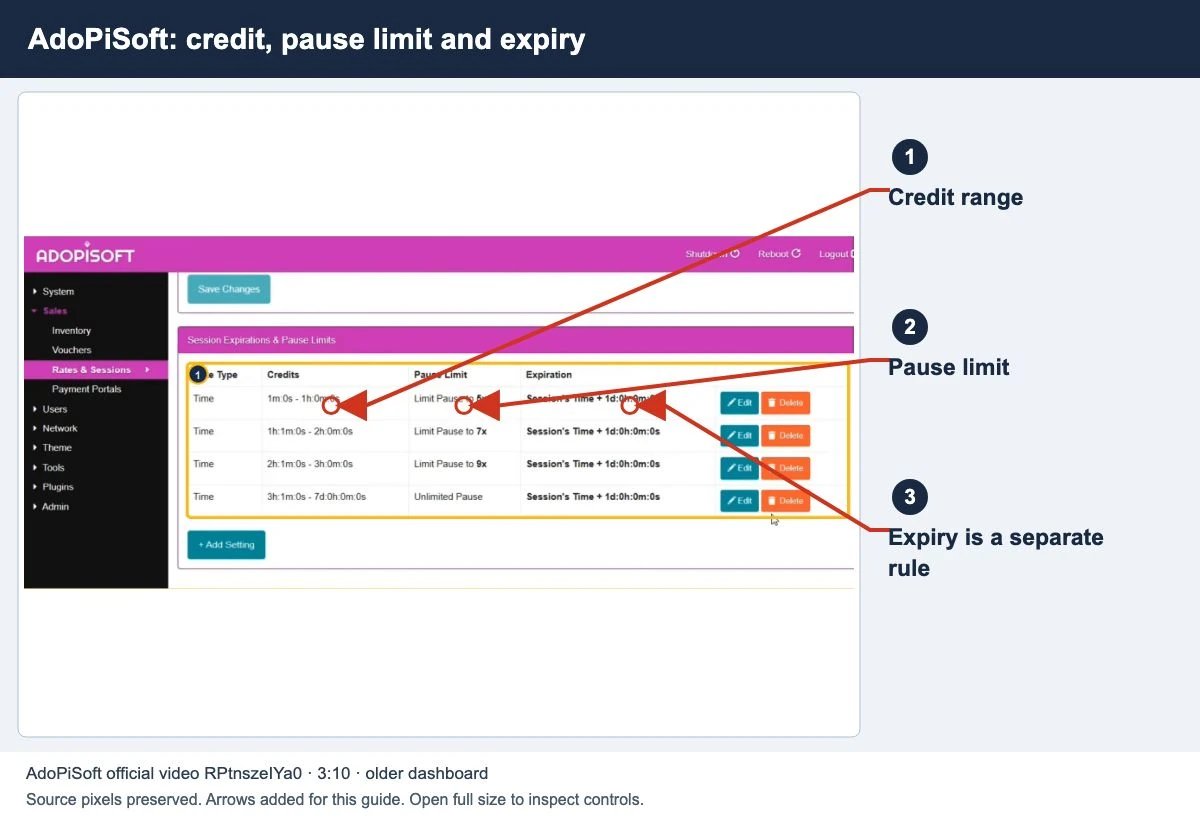
Review how pause limits and credit expiry work before you add more time. A paused timer does not always stop the expiry deadline.
Read the session before starting another payment
- Join the same vendo network on the device used for payment.
- Open its confirmed customer portal. If it does not load, follow the gateway checks first.
- Note whether the status is Active, Paused, Expired or no session. Copy the displayed remaining time, data allowance and validity privately.
- If the page offers Resume, read the limits before selecting it. If it reports Expired or shows no credit, ask the operator to check the record rather than assuming another payment will recover it.
A missing balance on another phone does not prove that the original session expired. Return to the original device and ask about supported recovery or transfer.
Four limits that are easy to confuse
| Limit | What it tells you | Question to ask |
|---|---|---|
| Remaining time | The unused timed credit reported by the portal. | Did the timer actually stop when Pause was requested? |
| Session or voucher expiry | The validity deadline or duration configured for the plan. | When did validity start, and what deadline applies? |
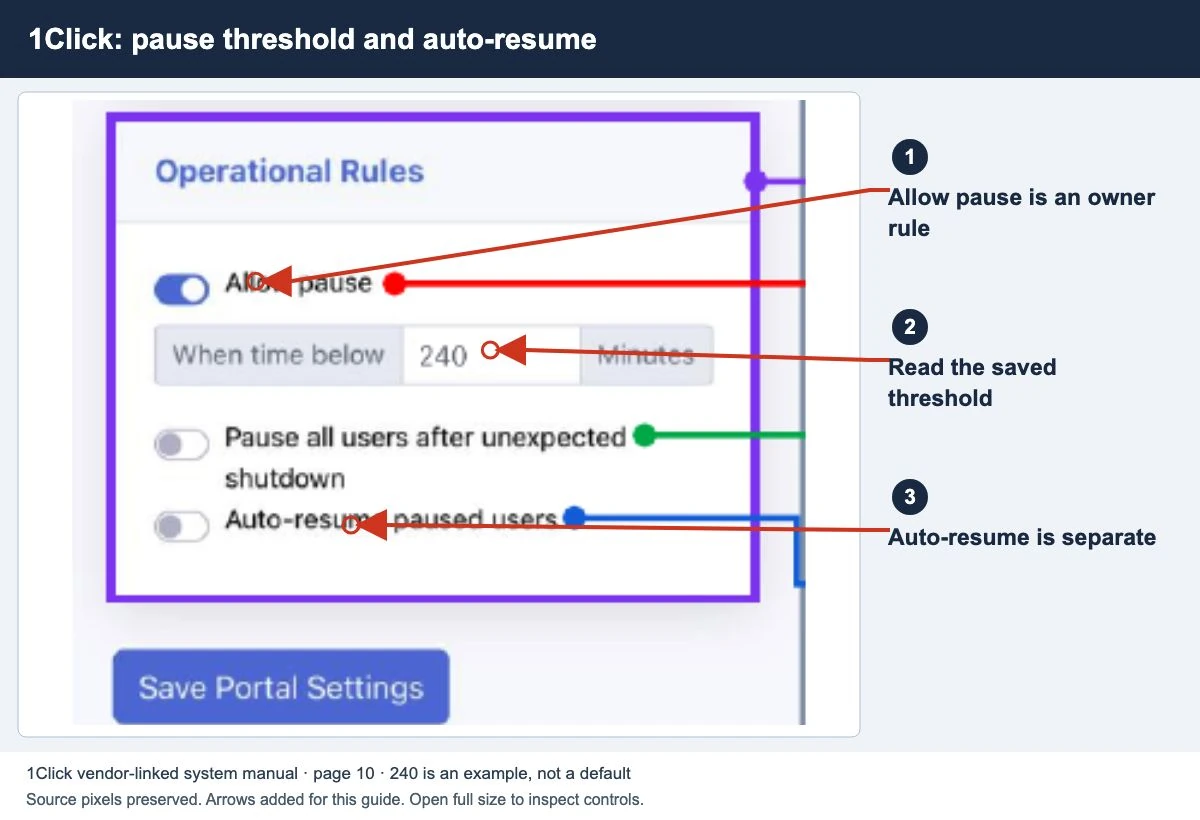
| Pause allowance | Whether pausing is permitted and whether a count or other restriction applies. | Was this session eligible for another pause? |
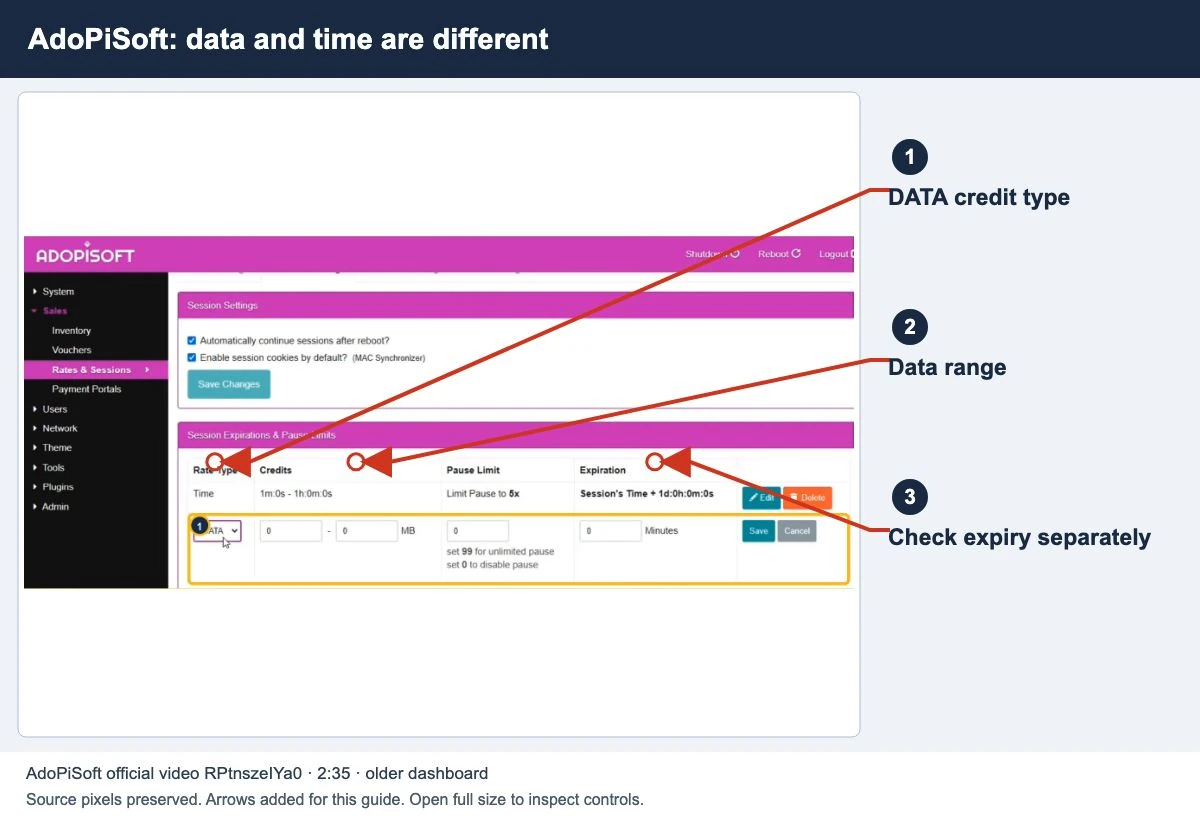
| Data allowance | The remaining data for a capped plan, where applicable. | Was data exhausted even though time remained? |
These labels may differ by platform. Ask the operator to explain the actual plan instead of interpreting a number without its label.
An example: minutes left, but validity ended
Imagine a plan explicitly sold as 60 minutes of use, valid until 6:00 p.m. You pause with 20 minutes remaining and return at 6:30 p.m. The unused minutes and the validity deadline now point to different things: you did not consume every minute, but the stated window has ended.
This is a made-up example to explain the distinction. It is not a default Piso WiFi rate or expiry rule. Before buying a real plan, ask when its validity starts, what stops while paused and what continues to expire.
If the portal never confirmed a paused state, the timer may not have stopped at all. Use the Pause control checks for that separate symptom.
What the platform documentation establishes
AdoPiSoft
AdoPiSoft documents session expiration rules and pause limits. For combined time-and-data credit, either limit can end internet access. Voucher settings separately cover expiry and permission to pause. The owner must check the rule applied to your session; examples in the manual are not universal defaults for every vendo.
LPB Piso WiFi
LPB advertises pause/resume and cloud session time. Those features alone do not establish a particular machine’s validity period, transfer rights or recovery options. Ask the operator to verify the installed setup. The LPB guide explains that distinction.
For an unbranded or different platform, use its own manual. Shared Piso WiFi branding does not make the session rules interchangeable.
What the operator can check
Provide the payment time, amount, machine identity and what the portal showed before and after pausing. Share voucher references privately. Explain whether the device, WiFi network or browser changed between visits.
The authorized operator can compare the session record, applicable plan and payment history, then explain whether a documented recovery or credit adjustment is available. Ask for that check before accepting a blanket claim that every missing session is permanently lost.
Do not factory reset the machine, change your device identity or buy an unrelated app to recover a balance. None of those steps verifies which rule ended the original session. If the payment never produced credit, use the missing payment guide instead.
Common questions
Does closing the browser pause the timer?
A closed tab is not a pause confirmation. Check the portal’s state and the operator’s rules.
Does turning WiFi off save all my time?
Do not assume it does. Ask whether automatic pause is enabled for your plan and how expiry works.
Can the publisher recover my session?
No. This site publishes instructions and has no access to local machine records. Contact the operator for session or payment decisions.
Screens to help you check the right thing
Real source screenshots and project diagrams, with arrows added for this guide. Interface values are preserved. These are labelled examples, not a test of your local machine. Open an image full size to inspect its controls.
Watch the matching portal example
A genuine vendor or vendor-linked tutorial. It demonstrates one platform and version; follow your operator’s actual portal and rates.
Sources and limits
Guide updated on 10 November 2026. This independent guide uses published platform documentation. We have not tested your local machine or every software version. Images marked as examples are illustrations. Captured screenshots show the source listed in the caption.
Found a website error? Send a correction to the publisher. For paid time or machine access, contact the local operator.